
📱 How to Use the In/Out Screen in ProdScanner for Essential Inventory Control
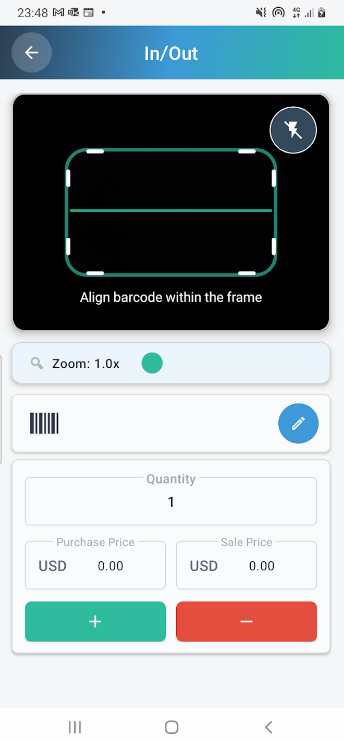
Managing your inventory and product tracking is simplified with ProdScanner. Using your smartphone’s camera, you can quickly add and withdraw items in seconds. The In/Out screen is the application’s core feature, offering a smooth workflow that benefits small shop owners, personal users, and anyone who wants to keep their stock organized. This screen is your key to maintaining accurate, up-to-date, and organized stock levels.
Whether you’re managing a small store, a personal collection, or tracking items for resale, this guide will walk you through every feature of the In/Out screen to enhance your stock management.
🔲 Fast Barcode Scanning or Manual
The top section of the screen is dedicated to the barcode scanning area—the heart of the app’s input system. The process is designed for speed: simply align the barcode within the green frame, and the app instantly reads the data.
For enhanced flexibility, you can:
- Adjust the zoom level to improve barcode detection.
- Turn on the flashlight for successful scanning in dim environments.
- Enter the barcode manually by tapping the pencil icon near the scanning area.
This versatile approach, supporting formats like QR Code, Code 128, UPC, and Data Matrix, makes ProdScanner a leading choice among barcode scanner apps for Android.
🧾 Quick Transaction Data Input
After the product is identified (via scan or manual entry), the screen shifts focus to capturing the essential transaction details before the stock level is adjusted.
Here is the key data you can manage directly on this screen:
- Set or change the quantity of items you are currently adding or removing.
- Input the purchase price (cost) and sale price relevant to this specific transaction.
- Quickly modify data for item with minimal taps.
By allowing you to record both cost and sale prices instantly, the app ensures you maintain precise financial and stock control.
➕ ➖ Finalizing Stock Movements (Add / Remove)
The bottom of the screen features two prominent, clearly labeled buttons for finalizing your transaction:
- Green “+” Button: Use this to add items to your inventory (Stock-In Operations).
- Red “–” Button: Tap this to withdraw items from your records (Stock-Out Operations).
This simple, color-coded mechanism ensures every action is intuitive. Each press instantly updates your records, guaranteeing real-time stock accuracy.
⚙️ Reliable Inventory Management Features
The efficient design of the In/Out screen provides reliability and prevents manual errors. Every recorded action feeds into the larger inventory management system.
From this integrated system, you can easily:
- Review and filter your past transaction history.
- Track the movement of your products.
- Export your stock data for detailed reporting or auditing purposes.
ProdScanner is designed to be a simple and practical inventory tool for everyday use that prioritizes speed, accuracy, and simplicity for all Android users.
🚀 Why Choose ProdScanner?
- Real-time and reliable barcode identification (scan or manual input).
- Simple, one-tap adjustment for adding or removing products.
- Full support for all major barcode formats (QR, UPC, Code 128, Data Matrix).
- Ability to log both purchase and sale prices per item/transaction.
Clean, highly functional interface optimized specifically for Android devices.
📲 Download the App
Get ProdScanner now on Google Play and start managing your inventory smarter and faster!
