1. Daily Transactions
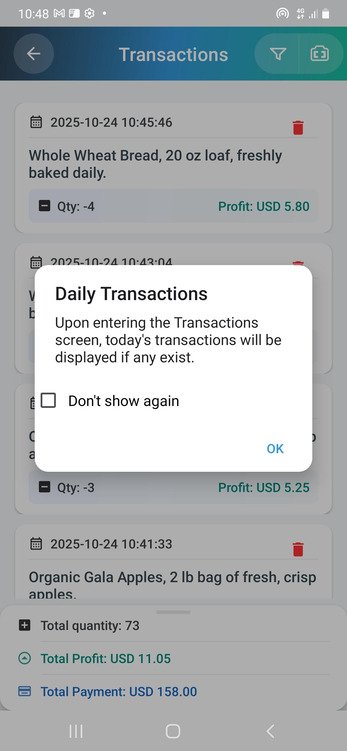
When you first open the Transactions screen, you’ll be welcomed with a daily transactions notification. This feature is designed to provide you with a quick, real-time glance at your day’s performance.
How it works:
- Instant, Automated Display: As soon as you access the Transactions screen, the app automatically displays all transactions processed that day, making it easy to track recent sales and profits.
- Individual Transaction Details: The screen lists each transaction separately, with financial details varying depending on the type:
- In (Purchases): The Payment field shows the amount paid to suppliers.
- Out (Withdrawals): The Profit or Loss field shows the profit or loss generated from the transaction.
- For “In” transactions, the quantity is shown as a positive number, and for “Out” transactions, it’s displayed as a negative number.
• Daily Performance Summary: The bottom of the screen presents an aggregated summary of all transactions for the day, showing: - Total Quantity: The sum of quantities that entered or left the inventory. This represents the number of units and is not tied to a specific product. It simply shows the total quantity of transactions for the day.
- Total Profit or Loss: The net profit or loss from all “Out” transactions.
- Total Payment: The total amount you’ve paid for purchases made that day (“In” transactions).
• Disable Option: If you prefer not to see the daily transaction pop-up notification, you can check the “Do not show again” box to prevent it from appearing in future visits. - Delete Transactions:
If you need to remove an incorrect or unnecessary transaction, the app offers a simple and secure deletion feature. Each transaction entry includes a red trash bin icon, allowing you to quickly delete it from your list.
Just tap the trash icon, confirm the action when prompted, and the transaction will be permanently removed from your records.
This feature ensures that your transaction history remains accurate, clean, and up to date, helping you maintain a clear overview of your daily business performance.
2. Filter Icon Options
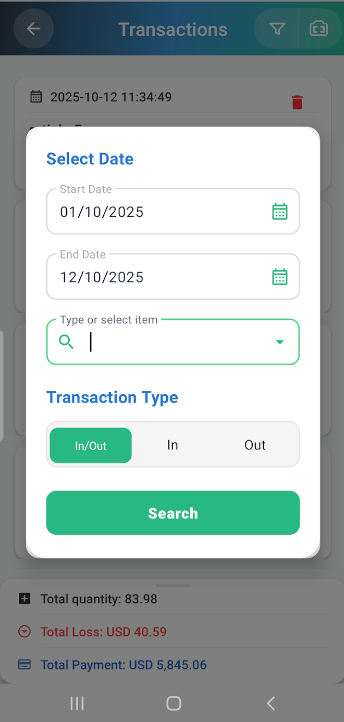
The filter icon is a powerful tool that allows you to narrow down your transaction history according to specific criteria. Use this feature to quickly access the data you need.
Explanation of Filter Options:
- Select Date:
- Start/End Date: Allows you to set a precise date range for review, such as filtering transactions from October 1, 2025, to October 12, 2025.
- Type or Select Item:
- You can start typing the name of a specific product (e.g., “Whole Wheat Bread”) or any letter or word found in the product list to filter results and display transactions related to that specific item.
- Transaction Type:
- **In (Purchases): Track items added to inventory (purchases). When selected, the total quantity of items added and the total payment amount you paid during the specified period, according to the filter criteria in the search field, will be displayed.
- **Out (Sales): Track items sold or withdrawn from inventory. When selected, the total profit or loss and the total quantity of items sold during the specified period, according to the filter criteria in the search field, will be displayed.
- Search Button:
- After selecting your filter criteria, click the search button to view results based on the specified parameters.
Practical Use of Filtering:
- Purchases: Track the amounts you’ve paid for products within a specific period using the Total Payment field.
- Sales: Evaluate the overall profitability of sales transactions that occurred using the Total Profit/Loss field.
3. Camera Icon
The camera icon provides the quickest way to search for a specific product within your transaction history.
Barcode Scan Feature:
- Once you click on the camera icon, the app activates your device’s camera to scan the product’s barcode.
- This action brings up detailed transaction information for the scanned item, showing its past transactions immediately.
- This feature enhances inventory management by enabling quick product tracking and offering a smooth method for reviewing historical sales data with accuracy and ease of use.
4. Maximizing the Transactions Screen
Collectively, the Daily Transactions feature, the advanced Filter Options, and the Camera Scan functionality transform the ProdScanner Transactions screen from a simple log into a powerful real-time command center. These tools ensure that you are never lagging behind on your financial health: the Daily Summary provides instant financial clarity, the Filters allow deep-dive analysis into specific profitability or costs, and the Camera guarantees effortless data retrieval. By integrating these features, ProdScanner empowers users to maintain 100% data accuracy, make swift, informed decisions about stock levels and pricing, and ultimately optimize overall business profitability without spending hours on manual record-keeping.
📲 Download the App
Get ProdScanner now on Google Play and start managing your inventory smarter and faster!
