
Adding Products in ProdScanner
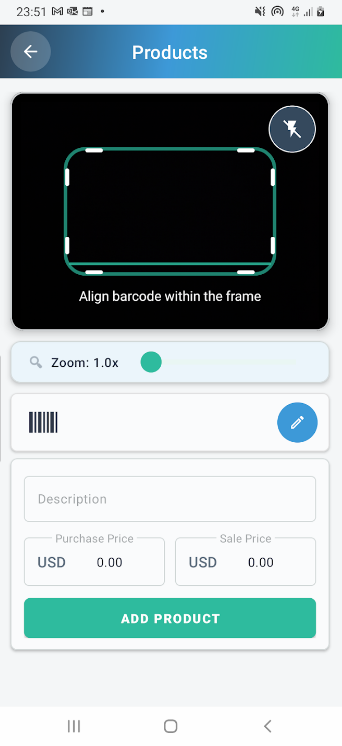
The Products screen in the ProdScanner app allows you to easily add new items to your inventory using the built-in barcode scanner. Simply align the product’s barcode within the frame to scan it instantly.
After scanning, you can enter the product description, along with its purchase price and sale price, and save the information with a single tap.
This process ensures that each product is added only once to the database, helping prevent barcode scanning errors when adding or removing items through the In/Out screen.
For users managing large inventories, ProdScanner also includes a feature to import multiple products at once using an Excel (CSV) file.
This bulk upload option is available in the Manage Products screen and is designed to save time and simplify product registration for businesses with extensive stock lists.
Key Benefits:
- Quick and accurate barcode scanning.
- Prevents duplicate or incorrect entries.
- Add full product details (description, purchase and sale prices) in one step.
- Bulk import feature via Excel (CSV) in the Manage Products screen.
- Keeps your inventory data accurate and easy to manage.
📲 Download the App
Get ProdScanner now on Google Play and start managing your inventory smarter and faster!

The website design looks great—clean, user-friendly, and visually appealing! It definitely has the potential to attract more visitors. Maybe adding even more engaging content (like interactive posts, videos, or expert insights) could take it to the next level. Keep up the good work!
Thank you for your valuable feedback! We’re glad you like the design and user experience of our website. Your suggestion about adding more engaging content is very helpful, and we’ll definitely take it into consideration.
If you haven’t tried ProdScanner yet, feel free to give it a try and let us know what you think. Thanks again for your support!