
📊Email Report Screen in ProdScanner: A Smart Way to Organize Your Daily Inventory
Keeping track of your products and daily stock movements is essential for staying organized — whether you manage a small shop, a home business, or your personal supplies.
That’s why ProdScanner includes a simple yet powerful feature called “Email Report”, designed to help you export and review your data easily whenever you need it.
With this screen, you can generate reports in Excel CSV format (Comma Separated Values) — a universal file type that you can open and edit using tools like Excel or Google Sheets. This makes it easier to review, analyze, or back up your inventory information.
📄 Available Report Types
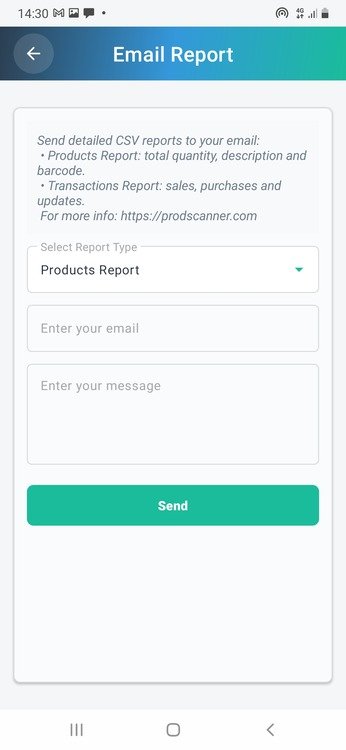
The Email Report screen offers two simple options to export your data, which you can choose from the “Select Report Type” dropdown list.
1. Products Report
This report gives you a quick and clear overview of the products currently in your inventory — perfect for daily stock checks.
| Report Content | Description |
|---|---|
| Products Report | Includes essential details like Total Quantity, Description, and Barcode for each product. |
How to Send:
- Choose “Products Report” from the dropdown.
- Enter the email address of the recipient.
- Enter the message.
- Tap “Send” to export your data.
2. Transactions Report – Track Your Daily or Weekly Activity
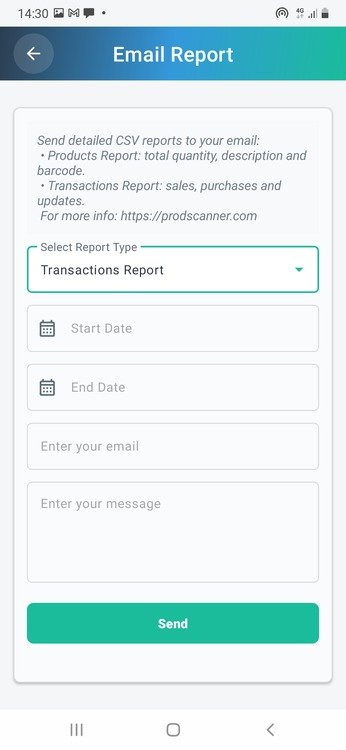
This report helps you review all stock movements — including sales, purchases, and updates — within a specific time range.
| Report Content | Description |
|---|---|
| Transactions Report | Summarizes all sales, purchases, and stock updates during the selected period. |
📊 Detailed CSV Columns
Each CSV file includes well-structured columns to make data analysis simple and clear:
| Column | Description |
|---|---|
| Barcode | The unique product code. |
| Description | The name or description of the item. |
| Quantity | The number of items sold or added. |
| Date | The date and time of the transaction. |
| Purchase Price | The buying cost of the product. |
| Sale Price | The selling price recorded in the transaction. |
How to Send:
- Select “Transactions Report.”
- Set the Start Date and End Date.
- Enter the recipient’s email address.
- Enter the message
- Tap “Send.”
📤 Easy Sharing and Cloud Access
Once you press “Send”, you can instantly share your CSV file through:
- Email apps like Gmail or Outlook
- Messaging or sharing apps of your choice
You can also open your exported CSV files directly from cloud storage platforms like Google Drive or OneDrive, making it convenient to access and analyze your data anytime, anywhere.
💡 Designed for Small Shops and Personal Use
ProdScanner is built for small shops, kiosks, workshops, or personal users who want a simple and reliable way to manage products and track daily activities — without complicated systems.
With the Email Report feature, you can keep your data organized, review performance, and make better decisions for your daily operations.
[WordPress Blog Template]
Title: How to Export Inventory and Transactions Reports in ProdScanner 📊
Category: Inventory Management, Productivity, Small Business Tools
Suggested SEO Tags:
- ProdScanner
- simple inventory management
- Email Report
- CSV report export
- small shop inventory
- personal stock tracking
- product management app
- daily inventory organization
Why Use ProdScanner?
Managing inventory doesn’t have to be complicated. ProdScanner offers an easy and efficient way to track your products, whether you run a small shop or simply want to stay organized in your daily activities. With features like barcode scanning, email reports, and CSV exports, ProdScanner helps you save time, reduce errors, and keep your stock under control — all from your smartphone.
📲 Download the App
Get ProdScanner now on Google Play and start managing your inventory smarter and faster!
