
Understanding the Settings Screen in ProdScanner
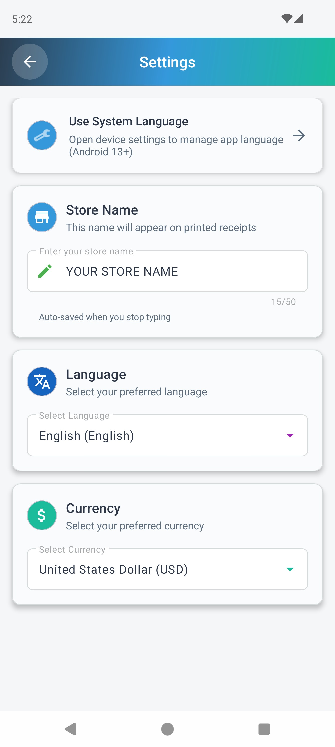
The Settings screen in the ProdScanner app allows you to personalize your experience by adjusting key preferences that make the app more convenient for your daily use.
1. Store Name (Receipt Header)
You can enter the name of your shop in the Store Name field.
Once saved, this name will automatically appear at the top of every receipt printed by your Bluetooth printer.
This helps you personalize your printed receipts and make them look more professional for your customers.
2. Change App Language
You can easily switch the app language by selecting your preferred language from the dropdown menu. After choosing, a message will appear asking you to restart the app. Once restarted, the interface will automatically display in the selected language.
3. Change Currency Display
This option lets you customize the currency used throughout the app — including product prices and transaction details. Simply select your desired currency from the available list, and the currency symbol and display format will instantly update, while your numerical data remains the same.
- Why These Settings Matter for You
With the ProdScanner Settings screen, you can easily adapt the app to your business needs — whether you manage a small store or personal inventory. Adjusting language and currency helps ensure a smooth, localized experience for better inventory management anywhere in the world.
Frequently Asked Questions (FAQs)
Q: Does changing the currency affect my old data?
A: No, the change is only related to how the data is displayed (symbol and format); it does not change the numerical value of previously recorded products and transactions.
📲 Download the App
Get ProdScanner now on Google Play and start managing your inventory smarter and faster!
